Understanding Run Status
|
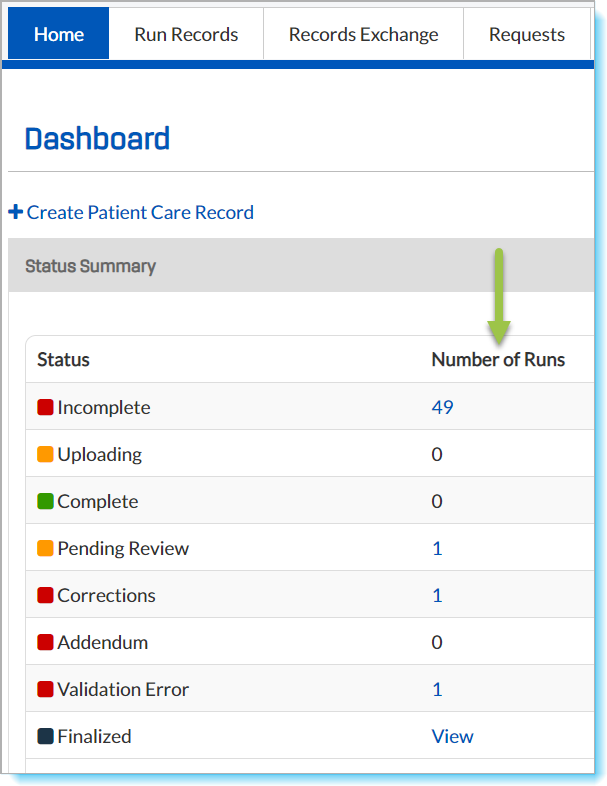
This summary corresponds to the various sections of the Home Dashboard page.
Click a number in the Number of Runs column to go directly to the corresponding selection window.
Click View Recent Records in the lower-right of the Status Summary section to go to the Recent Records window. |
 |
Tip: If you are logged off automatically while a run is open, the record is saved with a Local status in the Incomplete list. The record is automatically uploaded to CDX, if applicable, and if an Internet connection is available. To recover the "unsaved" run, click the number on the Incomplete row, then edit and save the run.
Run Statuses
The TripTix Quality Assurance process streamlines ePCR approval and finalization, cycling ePCRs from the point the record is saved through export. The workflow includes Windows, CDX and Department Administrator roles and various run statuses.
Note: Some statuses are used only if Supervisor Review is enabled for your department.
Runs Not Yet Uploaded
These are runs that reside only on the local Toughbook. If you are disconnected from the internet or you experience a hardware failure while a run is open, the run is saved on your device.
If you are disconnected from the internet, such a run uploads immediately when you reconnect. If you have a hardware failure or unexpected shutdown, you may be able to open this Runs Not Yet Uploaded queue and recover or discard the report.
Incomplete
Incomplete runs contain errors or were open when the system logged off automatically.
Check for and correct errors. When all errors are corrected, you are prompted to finalize the record.
Complete
Complete runs contain no errors, but warnings may still be present. Complete runs are queued briefly for NEMSIS Validation. When you submit a run for finalization, the run is listed here briefly while being validated. If the run passes validation, it either exports or it queues to Pending Review, depending on whether Supervisor Review is enabled for your department.
Pending Review
Runs in this queue contain no errors and are awaiting Supervisor or QA Review.
Corrections
Runs that have been sent back to the owner by a Supervisor or QA Reviewer for missing information to be entered are queued in Corrections. Re-edit to correct the record, and then resubmit it.
Note: While users can see a list of run records in Corrections in TripTix Windows, corrections can only be made in TripTix CDX.
Addendum
Runs in the Addendum queue have been sent back to the owner by a Supervisor or QA Reviewer requesting that the owner add an addendum to clarify or improve documentation. When the requested addendum has been added to the record, the user can resubmit it.
Note: An addendum can only be completed in TripTix CDX.
Validation Error
Runs that contain NEMSIS Validation errors are queued here for review by a supervisor. When a supervisor has identified the run's problem, the record is returned to its owner for correction.
(Validation errors occur when data in the record does not adhere to the Schematron provided by the state. This validation process is performed independently of the Error Check when the run is submitted.
Note: Records with the Validation Error status can only be edited from TripTix CDX.
Finalized
Runs in the Finalized queue can no longer be edited by the report owner. They can, however, be viewed or saved as a PDF.