In TripTix Web, adding patient complaints is slightly different than in TripTix Windows. The following procedures outline how to add and manage patient chief complaints in TripTix Web.
To add a complaint in Web
-
In the side navigation of an open run record, click Chief Complaint. The Complaint subsection is displayed.
-
Click Add Complaint. A new row opens in the complaints table.

-
Select the appropriate type of complaint, such as Chief (Primary) or Secondary.
-
For Complaint, enter the patient's chief complaint.
-
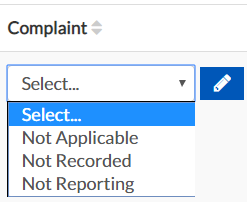
Optionally, to select a not value for this field, click the Not Value button.

-
Select the appropriate not value: Not Applicable, Not Recorded, or Not Reporting.
-
If you wish to enter a custom chief complaint value instead, click the Edit button.
-
-
For Duration, enter the numerical value in the first field and select units for the second.
To edit or delete a complaint in Web
-
In the side navigation of the open run record, click Chief Complaint. The Complaint subsection is displayed.
-
Go to the complaints table.
-
Click in the field you want to edit and make your changes.
To delete a complaint, click the appropriate complaint's corresponding trash can icon.