To view the PDF version of an incomplete run record without going through the faxing process, follow the procedure outlined below.
To view the PDF version of a run record
-
From any page, go to either Run Records: Recent Records or Run Records: Incomplete Runs.
-
Locate the run record for which you want to view the PDF and, in the final column, click the run's corresponding Actions button.
-
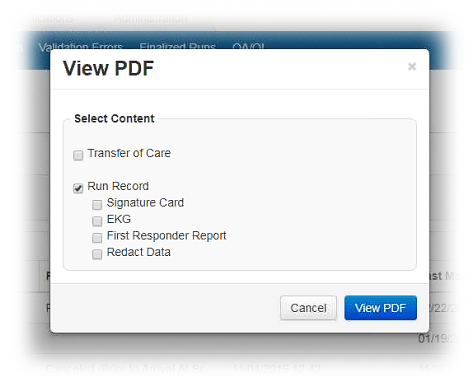
From the list, select View. The View PDF window opens.
-
Select the content you want to see in the PDF: signature cards, EKGs, and/or the first responder report.
-
Optionally, to view a de-identified version of the run record that redacts certain patient demographic information, select Redact Data.
-
Click View PDF.