Depending on a department's configuration, users may be prompted with a reminder upon login. These reminders notify users of incomplete runs, runs requiring addendums, and other important items that must be addressed in a timely manner.
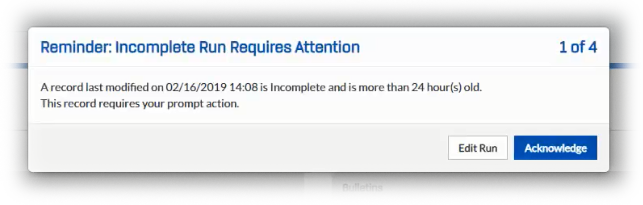
When configured and active, these login reminders pop up as soon as the user logs in. The pop-up window is characterized by a number in the upper right corner that indicates the number of reminders the user has, the message regarding what needs to be addressed, and buttons allowing a user to either acknowledge or immediately address the run in question.
Acknowledge a Login Reminder
If you receive a pop-up reminder upon logging in, you do not have to immediately edit the run. Instead, you have the option of acknowledging the reminder and performing whatever action you intended when logging in. Acknowledging the reminder eliminates the pop-up window or opens up any subsequent reminders.
Once a reminder is acknowledged, it will be silenced until either the run is revised accordingly or you log out and back in without having made any resolution.
Edit a Run from the Login Reminder Window
If the reminder involves a simple update or you have the time to readily make the resolution, click the Edit Run button associated with the reminder. The run record tied to that specific reminder opens and you can make adjustments as required.
Note that if you have multiple reminders, outstanding login reminders will still appear on the CDX dashboard even after resolving the first reminder. If redirected to the Recent Records page after editing, however, any remaining reminders will not be seen. The reminder associated with the first notification will not reappear after it is resolved.